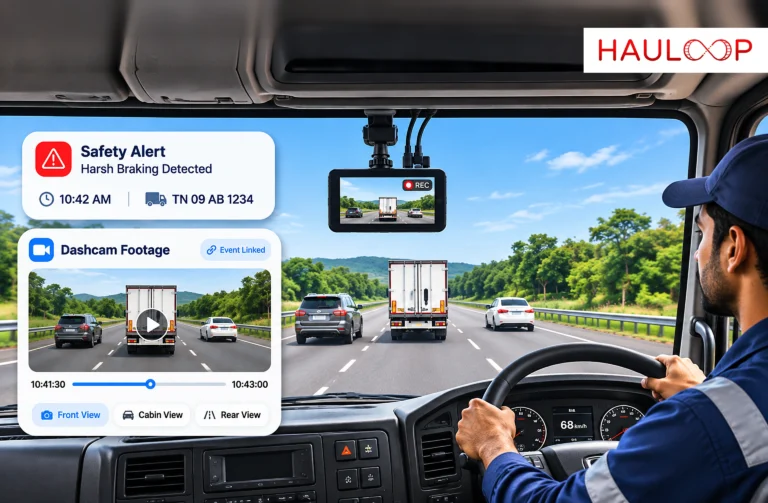
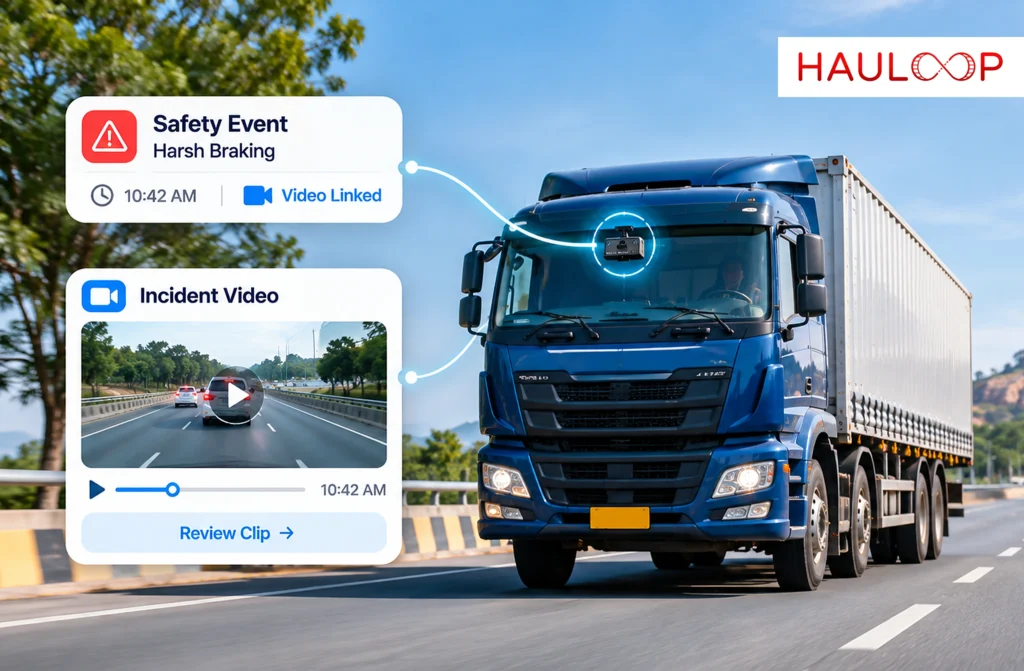
A fleet manager receives a harsh braking alert from a delivery truck operating on a busy highway.
The alert includes the vehicle details and the time of the event.
But what happened on the road?
The manager could contact the driver, ask for an explanation, and attempt to reconstruct the situation.
Alternatively, if the truck has a connected dashcam, the relevant video clip may already be linked to the recorded event.
The manager opens the alert and reviews footage showing the vehicle’s surroundings before, during, and after the braking incident.
This is the practical value of dashcam integration in fleet management.
Instead of treating vehicle data and video recordings as separate sources, an integrated system connects them to support incident review.
But how does the system identify the relevant footage, and why does that connection matter when investigating safety events or insurance claims?
What does Dashcam Integration Mean in Fleet Management?
Dashcam integration connects compatible vehicle cameras with a fleet management platform.
The purpose is to make recorded video accessible alongside relevant vehicle and driving event information.
A conventional dashcam may store footage locally on the camera or its memory card.
Retrieving a specific incident could require identifying the vehicle, locating the recording, and searching through video manually.
An integrated system can simplify that process by connecting driving events with corresponding footage.
Hauloop’s Dashcam Integration includes event-linked video clips, live feed access, multi-angle camera support, smart video retrieval, and centralized video management.
This allows fleet managers to investigate recorded incidents through a more connected workflow.
The exact footage availability depends on camera compatibility, network connectivity, storage, and system configuration.
How does a Driving Event Become a Video-Linked Safety Alert?
A connected dashcam system can associate a driving event with footage recorded around the same time.
The process generally involves several stages.
1. Continuous Video Capture
Compatible dashcams record road activity while the vehicle is operating, according to their recording configuration.
Depending on the hardware, footage may include front, rear, or cabin views.
2. Driving Event Detection
The fleet monitoring system identifies a supported driving event, such as harsh braking or sudden movement.
The event is recorded with relevant information, including the vehicle identity and timestamp.
3. Event-Based Video Tagging
The system associates the detected event with the corresponding video recording.
This makes it possible to locate footage without manually searching through an entire journey.
4. Video and Data Synchronization
The recorded event is linked to the relevant moment in the footage.
The accuracy of this connection depends on synchronized timestamps and the recording system’s operation.
5. Contextual Video Review
The fleet manager can retrieve the available clip and review the visible circumstances surrounding the event.
Hauloop’s integration supports playback that includes footage before, during, and after recorded incidents.
6. Investigation and Response
The manager uses the available video and driving data to assess the event, determine whether further investigation is required, and follow the appropriate response process.
This creates a connection between an alert and the visual information needed to understand it.
Why is Event-Linked Video More Useful Than Searching Through Recordings?
Consider a fleet operating 50 trucks.
If each vehicle records several hours of footage daily, the volume of video can become substantial.
When an incident occurs, manually searching through recordings may require significant effort.
The manager must identify the vehicle, establish the approximate incident time, locate the recording, and find the relevant sequence.
Event-linked video reduces that search process.
Instead of reviewing unrelated footage, the manager can start with the recorded driving event.
For example, a harsh braking alert can provide a direct reference to the corresponding video clip when the footage is available.
Hauloop’s smart video search and retrieval capabilities also support locating recordings using information such as time, driver, or event type.
This helps make video monitoring more practical for fleets managing multiple vehicles and daily driving events.
How does Video Context Change the Interpretation of Safety Alerts?
A driving alert identifies a monitored event.
Video provides additional information about the surrounding circumstances.
For example, two drivers may receive similar harsh braking alerts.
The first driver’s footage shows a pedestrian unexpectedly entering the road.
The second driver’s footage shows the truck approaching slow-moving traffic without reducing speed early enough.
Although both alerts involve harsh braking, the visible circumstances are different.
The first may reflect an appropriate emergency response.
The second may indicate a driving practice worth reviewing.
This distinction matters when fleet managers evaluate safety performance.
Without video, the manager may treat both events as equivalent.
With event-linked footage, the manager can consider the context before deciding whether coaching or another response is appropriate.
Can Dashcam Integration Support Immediate Incident Review?
Hauloop’s Dashcam Integration includes live dashcam feed access and incident review tools.
These capabilities can help fleet managers examine available on-road video without waiting for a driver to return to the depot.
For example, if a vehicle is involved in a reported collision, the operations team may be able to retrieve the relevant recording and review the visible incident sequence.
Where supported, live video can also provide additional information about the vehicle’s current surroundings.
However, immediate access depends on the camera’s connection, recording availability, and platform configuration.
A vehicle operating without usable network coverage may not be able to transmit footage at that moment.
Video files may also require time to upload or become available for retrieval.
Therefore, an alert arriving immediately does not necessarily mean its associated video is instantly accessible.
Fleet managers should distinguish between event notification speed and video availability.
How does Synchronized Video Support Insurance Investigations?
Insurance investigations often require a clear account of how an incident occurred.
For example, after a collision, the insurer may request information about the vehicle’s movement, the surrounding road conditions, and the events leading up to the impact.
A driving alert may establish that sudden braking or another monitored event was recorded.
Dashcam footage may show what was visible around the vehicle at the relevant time.
When the two are synchronized, the fleet operator can retrieve the corresponding video and examine it alongside the recorded event.
This can help the team prepare a more structured account of the incident.
However, video evidence does not automatically determine liability or guarantee an insurance claim outcome.
The insurer may also consider photographs, incident reports, witness statements, vehicle records, and applicable policy conditions.
The purpose of integration is to make relevant information easier to locate and review, not to replace the insurer’s assessment.
Why does Footage Retrieval Matter When an Insurance Claim is Raised Later?
Not every insurance-related question is raised immediately after an incident.
A third-party complaint may arrive several days later.
The fleet manager may then need to identify the relevant journey and retrieve the video associated with the reported event.
If recordings are stored without a searchable structure, locating the correct footage can be difficult.
Hauloop’s centralized video management and smart retrieval capabilities help organize available recordings for later investigation.
Fleet managers can search for relevant footage using supported criteria and review it alongside associated driving information.
However, retrieval depends on the recording remaining available.
Video retention periods, storage limits, overwriting policies, and camera connectivity can affect whether historical footage can be recovered.
For important incidents, relevant video should be preserved promptly according to the organization’s evidence-handling procedures.
What is the Difference Between Live Dashcam Monitoring and Event-Linked Playback?
Live monitoring and event-linked playback serve different purposes.
| Live dashcam monitoring | Event-linked video playback |
| Shows available current camera footage | Shows footage associated with a recorded event |
| Supports present operational awareness | Supports incident investigation |
| Depends on live camera connectivity | Depends on recorded footage availability |
| Helps review current road activity | Helps reconstruct a past event |
| May support immediate situational checks | Helps verify the context of specific alerts |
A fleet manager may use live monitoring to understand a current situation.
Event-linked playback is more useful when examining a particular incident that has already occurred.
Hauloop also supports full trip playback with synchronized data and video, allowing available journey footage to be reviewed in a broader sequence.
The appropriate feature depends on whether the manager needs current visibility or historical incident context.
How can Multiple Camera Views Strengthen an Investigation?
A single camera cannot capture everything happening around a commercial vehicle.
For example, a forward-facing camera may show traffic ahead but provide limited information about activity behind the truck.
A rear-facing camera may help review following traffic.
A cabin-facing camera may provide information about visible driver actions.
Hauloop’s multi-angle camera support allows compatible camera views to be used within the integration.
During an investigation, the fleet manager can review the available angles to better understand the sequence.
This is particularly useful when incidents involve turning movements, lane changes, or conflicting accounts of driver behaviour.
However, additional cameras do not guarantee complete visibility.
Blind spots, camera placement, lighting, and recording quality still affect what can be established.
How does Centralized Video Management Help Large Fleets?
Managing video becomes more complicated as the number of vehicles increases.
A small fleet may be able to retrieve recordings from individual cameras when necessary.
A larger operation may need to investigate multiple incidents across different vehicles and locations.
Centralized video management provides a common environment for accessing and organizing available dashcam recordings.
Instead of handling footage separately for every vehicle, authorized users can review relevant video through the connected platform.
This supports fleet-wide monitoring and more consistent incident investigation.
It can also help managers compare recurring driving events across vehicles, provided the required records are available.
Access permissions and privacy controls remain important, particularly when recordings include drivers or members of the public.
How can Event-Linked Video Improve Driver Coaching?
Video evidence can make safety discussions more specific.
For example, a manager may notice repeated sudden movement alerts associated with one driver.
Rather than discussing the alert count alone, the manager can review selected video clips to understand the circumstances.
Some events may involve unavoidable road hazards.
Others may show opportunities to improve anticipation, following distance, or driving consistency.
The manager can then discuss the recorded situations with the driver and provide relevant coaching.
This approach is more useful than treating every alert as a violation.
Video-based coaching should remain fair, transparent, and consistent with applicable privacy and employment requirements.
The objective is to improve safety through informed feedback rather than using footage without context.
What should Fleet Managers Check Before Relying on Dashcam Integration?
An effective dashcam integration depends on more than installing cameras.
Fleet managers should understand how video is recorded, linked, stored, and retrieved.
Important considerations include camera compatibility, available recording angles, timestamp synchronization, network coverage, and video retention settings.
They should also confirm how event-triggered footage is identified and whether relevant recordings remain accessible after connectivity interruptions.
For insurance-related investigations, secure evidence handling is particularly important.
Organizations should establish who can access recordings, how important footage is preserved, and how video is shared with authorized parties.
These procedures help ensure that video information remains useful when an incident requires formal investigation.
Conclusion
Driving event data can tell fleet managers when something unusual happened.
Dashcam footage can help explain the visible circumstances surrounding that event.
By connecting the two, fleet operators can move from isolated alerts to more informed incident reviews.
Event-linked video, contextual playback, smart retrieval, and centralized video management help teams investigate driving behaviour, examine road incidents, and prepare supporting information for insurance enquiries.
The technology does not eliminate uncertainty or guarantee dispute outcomes.
It makes relevant visual information easier to access and evaluate alongside fleet data.
Hauloop’s AI Fleet Management Software connects dashcam footage with driving events to support more informed safety monitoring and incident investigations. Book a demo to explore how Dashcam Integration can bring video context into your fleet operations.
Frequently Asked Questions
What is dashcam integration in fleet management?
Dashcam integration connects compatible vehicle cameras with a fleet management platform so operators can access video footage alongside driving events and other available vehicle information.
How does dashcam footage sync with driving safety alerts?
The system associates supported driving events with corresponding video recordings using event information and timestamps. Fleet managers can then retrieve the available footage to review the circumstances surrounding the alert.
Can dashcam integration help with insurance claims?
Yes. Event-linked footage can provide supporting visual evidence for incident investigations and insurance enquiries. It does not guarantee claim approval or determine liability independently.
Can fleet managers access dashcam footage in real time?
Compatible systems may support live video access when the camera, communication network, and platform are available. Connectivity and hardware limitations can affect access.
What is event-linked video playback?
Event-linked playback allows fleet managers to review footage associated with a recorded driving event, often including available video before, during, and after the incident.
Can dashcam integration improve driver safety?
It can support driver safety reviews by providing visual context for recorded events, helping managers distinguish between road conditions and potentially avoidable driving practices.