Detours Stop Hiding Between Stops
A vehicle can still reach every expected stop while taking an unexpected path between them. Breadcrumb data exposes those deviations instead of letting the stop list hide them.
Stops show where a vehicle paused. Hauloop records the point-by-point trail between them, giving operations the path detail needed to uncover route drift, unexpected detours and where the vehicle actually travelled.
Start Your 3-Month Trial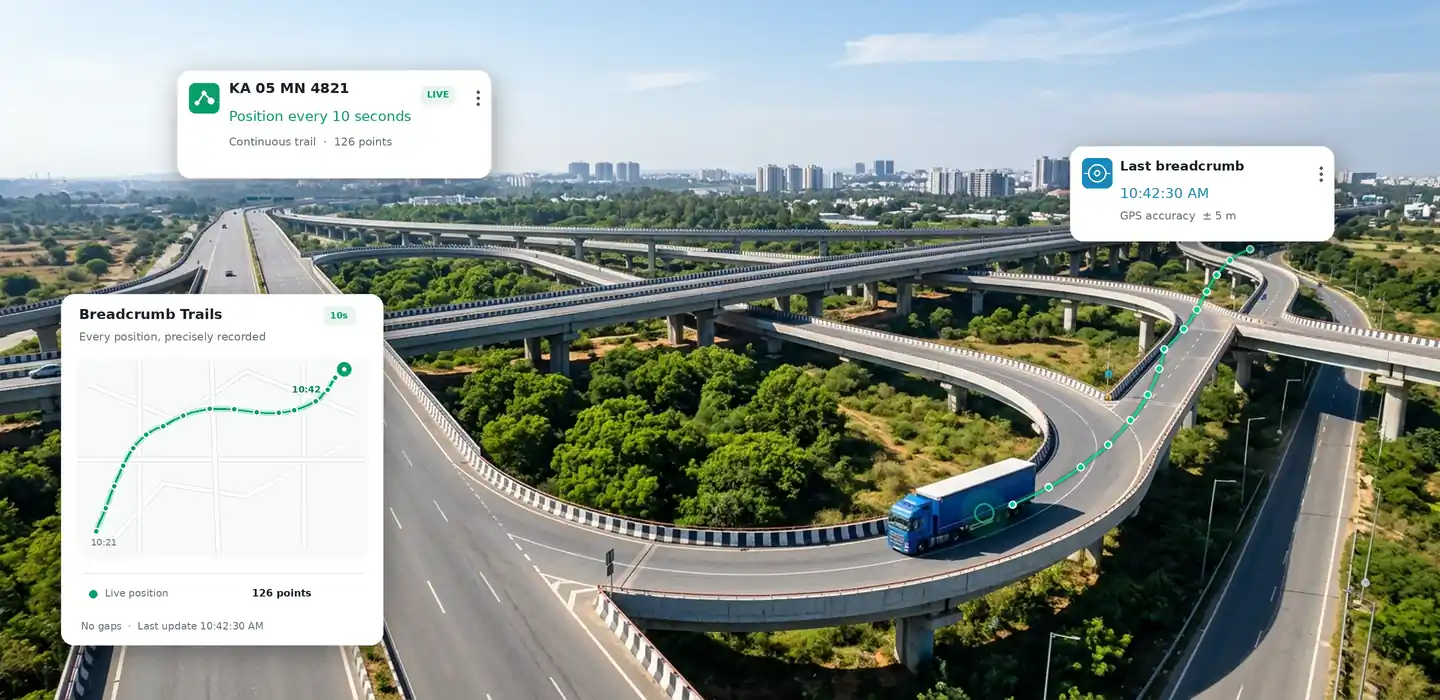
A vehicle can still reach every expected stop while taking an unexpected path between them. Breadcrumb data exposes those deviations instead of letting the stop list hide them.
See where the vehicle gradually moved away from the expected corridor, giving operations the detail needed to investigate recurring route behaviour that destination records alone cannot explain.
When several roads could connect the same locations, the breadcrumb trail preserves the vehicle’s recorded path instead of leaving teams to assume which way it travelled.
Understand the movement between recorded stops rather than seeing only the points where the vehicle paused, creating a more complete picture of how distance was actually covered.
When mileage, timing or a journey outcome does not make sense, operations can examine the recorded path between stops to identify where the movement differed from what was expected.
Compare how vehicles travel between familiar locations and identify recurring deviations that may otherwise remain hidden when operations review only start points, stops and destinations.
Follow the individual GPS points recorded along the vehicle’s path, revealing movement between stops that would otherwise be missing from a basic journey record.

Open the recorded path for a vehicle to examine where it travelled between locations, rather than working only from its start point, stops and destination.

Trace the sequence of recorded GPS points along the road travelled, giving operations a continuous route trail to examine when the path itself matters.

Identify sections where the recorded trail moved away from the expected route, making unexpected diversions easier to isolate within the vehicle’s path.

Examine where and how a vehicle began moving away from its expected travel corridor instead of seeing only that it eventually reached the next location.

Inspect the movement connecting two recorded stops, filling the operational gap between one known location and the next with point-level GPS data.

View GPS breadcrumb points in their recorded order, preserving the sequence needed to understand how the vehicle progressed along a particular section of its journey.

Focus on a specific section of the recorded trail when operations need to examine one part of the vehicle’s movement rather than the entire journey.

Keep the recorded breadcrumb data associated with the vehicle path, giving operations a historical source for reviewing how a particular route segment was travelled.

From the first recorded GPS point to the completed trail, Hauloop connects breadcrumb data in sequence so operations can examine how a vehicle travelled between one known location and the next.
As the vehicle moves, connected GPS data creates individual location points that form the underlying breadcrumb record of its movement between stops.
Hauloop places recorded points in sequence, connecting separate GPS positions into a continuous representation of the path the vehicle followed.
Operators can trace the resulting trail between locations, seeing how the vehicle progressed rather than jumping directly from one recorded stop to another.
Sections that move away from the expected travel path give operations a specific point to examine when investigating route drift or an unexpected detour.
Return to the recorded breadcrumb sequence and focus on the path segment that matters, giving operations point-level movement detail for further review.
See what changes when operations can examine the recorded path between stops instead of knowing only where a vehicle started, paused and finished.
Start points and destinations may look correct while the actual roads travelled between them remain unknown to the operations team.
GPS breadcrumb points preserve the vehicle’s movement between known locations, showing the road actually followed rather than leaving the middle of the journey blank.
A vehicle may eventually reach the expected location even after taking an unplanned diversion that is not obvious from stop records alone.
The recorded path shows where movement changed direction, giving operations a specific section to examine instead of assuming the expected route was followed.
Small changes in the path can accumulate without attracting attention when teams review only the locations where the vehicle stopped.
The breadcrumb sequence shows how the vehicle moved away from its expected travel path, making the development of route drift easier to examine.
When recorded distance looks unusual, operations may know something changed without being able to see which part of the vehicle’s movement caused it.
Path-level detail gives teams a place to investigate the additional movement and understand where the vehicle travelled differently between known locations.
Understanding an unusual path may require asking the driver or searching through other operational information to establish where the vehicle actually travelled.
Operations can begin with the recorded breadcrumb trail and isolate the relevant section before deciding whether any further explanation or investigation is needed.
Similar path changes across regular journeys can remain disconnected when there is no detailed movement record between the same operating locations.
Recorded path detail gives operations a consistent basis for comparing how vehicles moved between familiar locations and identifying recurring deviations worth investigating.
Point-Level
GPS Path Detail
Between Stops
Movement Captured
Path-by-Path
Route Trail Detail
Detour Detail
Unexpected Movement
Historical
Vehicle Path Records